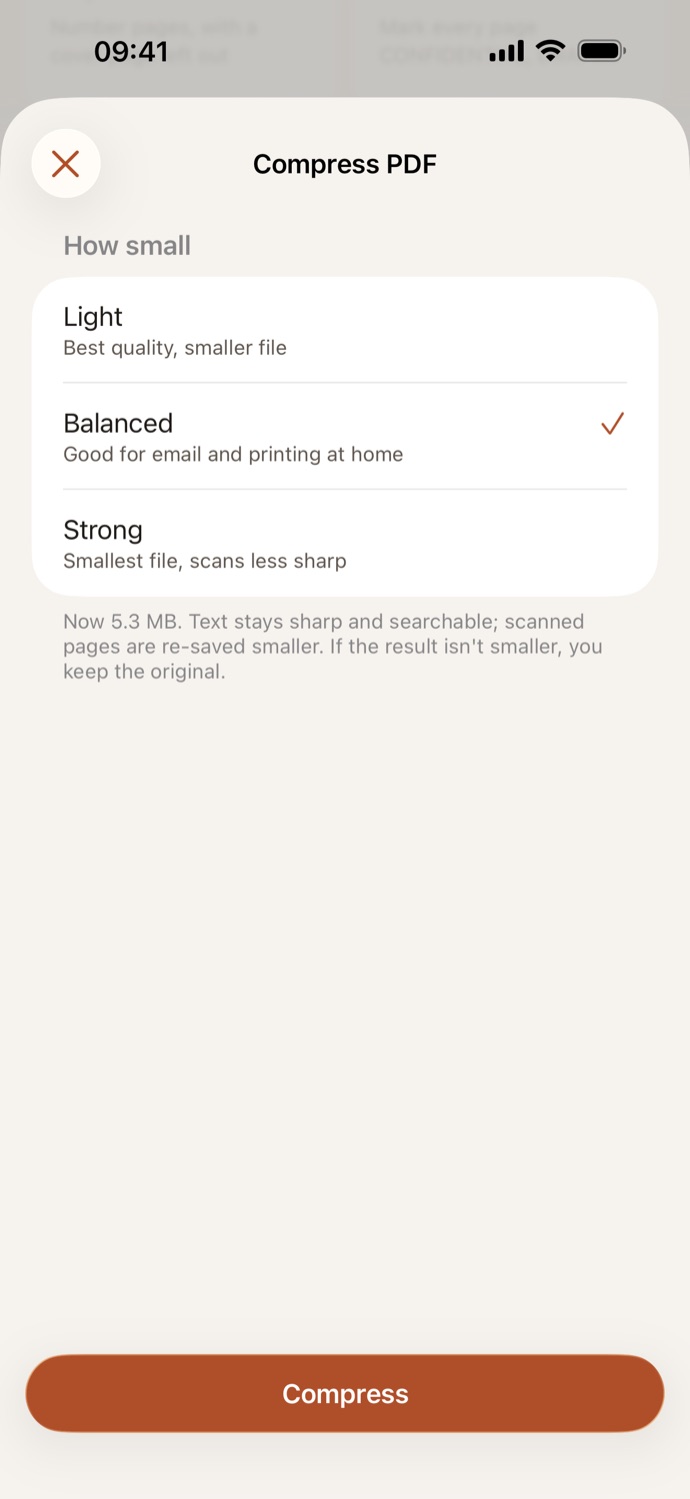
How to compress a PDF.
Three steps, all on your device.
Pick your PDF
Open Compress PDF and choose a file from Your files in CapsaPDF, or from the Files app. Pick several to compress them all with the same setting.
Choose how small
Light keeps the best quality, Balanced is good for email and printing at home, and Strong makes the smallest file, with scans less sharp. Balanced is set for you.
Compress
Tap Compress. CapsaPDF shows the size before and after and saves the smaller copy in Your files, ready to share, sign or protect.
Smaller scans, with the text still sharp.
- Scanned pages are saved again, smaller. Pages with real text keep their text and vector graphics, so they stay sharp and searchable. Bookmarks, links and form fields keep working.
- Shrink a scanned contract or a month of receipts so it fits in an email or an upload form.
- If the compressed copy wouldn’t be smaller, you keep the original, and CapsaPDF tells you it’s already as small as it gets.
- Go on from the result: sign it, add a password, or make the scan searchable.
Good to know
- Works with
- One PDF, or several at once, from Your files or the Files app
- You get
- A smaller copy, with the size before and after; your original stays as it was
- Batches
- Several files at once, with the same setting; each gets its own copy
- Shortcuts
- A Compress PDF action, with a choice of strength
Compressed on your device.
Online compressors upload your file to shrink it. CapsaPDF does it on your iPhone or iPad, with no account and no network features, so the scanned IDs, payslips and contracts you shrink to send never leave your hands. Privacy Policy
Questions.
Is my PDF uploaded when I compress it?
No. CapsaPDF compresses the file on your iPhone or iPad and has no network features, so nothing is uploaded and it works offline.
Will compressing lower the quality?
Text and vector graphics aren’t touched, so they stay sharp. Scanned pages are saved again, smaller: Light keeps the best quality, and Strong makes the smallest file, with scans less sharp.
Why didn’t my PDF get much smaller?
Compress PDF works best on scans. A PDF that’s mostly text is already small, and pages with text and photos shrink less than scans. If the copy wouldn’t be smaller, you keep the original.
Can I compress several PDFs at once?
Yes. Pick several files and each is compressed with the same setting into its own copy. CapsaPDF shows their total size before and after.
Is compressing PDFs free?
Yes. CapsaPDF is free, with every tool included, no ads and no purchases.